

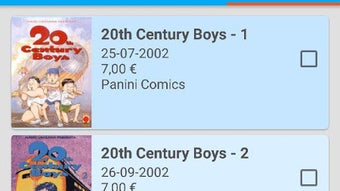
Description
Download AnimeClick it APK – anime app, manga reader, watch anime online, read manga, anime database, free anime app, Android app, anime fan app
Overview
AnimeClick it APK is a free Android application developed by Stefano Ceci, designed for fans of anime and manga seeking a centralized platform to explore, watch, and read their favorite content. The software aims to streamline access to anime series and manga volumes by offering a structured interface that combines search, viewing, reading, and personal tracking features. It caters primarily to casual and dedicated fans who enjoy consuming anime and manga digitally without the need for multiple platforms.
The app addresses the common challenge of fragmented content discovery by consolidating information about anime episodes, manga chapters, genres, and user progress into a single experience. Users can search by title or genre, track their favorite series, and stay updated with new releases through notifications. Real-world use cases include daily binge-watching sessions, following ongoing manga arcs, or maintaining a personal library of completed or in-progress series.
While the developer is identified as Stefano Ceci, no further details about the company or background are provided. The app is tailored for mobile users on Android devices, emphasizing convenience and ease of access. It supports offline tracking via the library and favorites features, making it suitable for users who prefer to manage their content even without constant connectivity.
Key Features & Capabilities
- Search Functionality – Offers two search modes: by title and by genre. Each category is subdivided into specific genres such as Action, Drama, and others, enabling precise content discovery.
- Watch Anime Online – Provides access to the latest episodes of anime series directly within the app, allowing users to stream content without external links.
- Read Manga Online – Enables users to read the most recent chapters of manga series, supporting continuous engagement with ongoing stories.
- Personal Library – Allows users to save anime and manga they’ve watched or read, creating a customizable collection for easy access and progress tracking.
- Favorites System – Lets users mark preferred series for quick access, improving navigation efficiency and personalization.
- Customizable Settings – Includes options to adjust language, theme, and other interface preferences to suit individual tastes.
- User Profile – Displays user activity, progress, and achievements, enhancing engagement and personal investment in the platform.
- Push Notifications – Sends alerts for new episodes and chapters, helping users stay current with their favorite series.
- Support & Feedback – Offers a channel to report bugs, suggest features, and contact the development team for assistance.
- About Section – Contains basic app information, including version number, developer details, and licensing.
These features collectively create a cohesive experience for fans who want to manage their anime and manga consumption in one place. For example, a user can search for a new action anime, add it to their favorites, watch the latest episode, and later review their progress in the profile section.
User Interface, Workflow & Performance
The application features a clean, functional interface with a main screen displaying all available functions in a structured layout. Navigation appears to be straightforward, with clearly labeled icons or menu items for each core function, such as Search, Watch, Read, Library, and Settings. The workflow is designed to guide users from discovery to consumption and tracking, minimizing friction across steps.
Based on general mobile app behavior patterns, the app likely supports smooth transitions between screens and responsive interactions. However, exact performance details such as CPU or RAM usage were not specified. The developer did not provide additional system requirements or performance benchmarks. Stability is expected to be consistent with standard Android applications of similar scope, but real-world behavior may vary depending on device capabilities and network conditions.
Given the app’s size of 20.3 MB, it is lightweight and optimized for efficient installation and operation on a wide range of Android devices. The absence of reported crashes or performance issues in the provided description suggests a stable user experience, though user feedback beyond the provided data is unavailable.
Compatibility & System Requirements
AnimeClick it APK is designed exclusively for Android devices. The specific Android version compatibility was not listed, but the app is available as an APK file, indicating support for a broad range of Android versions, including older ones. The installation size is 20.3 MB, which is relatively small and suitable for devices with limited storage.
Exact system requirements were not listed, including minimum RAM, processor specifications, or storage space beyond the installed file size. The developer did not provide details about hardware compatibility or supported screen resolutions. Platform compatibility information is limited to the Android operating system.
Users should ensure their device meets general Android app requirements to run the application smoothly. For optimal performance, devices with at least 2 GB of RAM and a modern processor are recommended, though this is inferred based on typical app standards and not confirmed by the developer.
Pros and Cons
Pros
- Free to download and use with no in-app purchases or ads mentioned
- Comprehensive feature set tailored for anime and manga fans
- Lightweight installation size (20.3 MB)
- Supports both watching anime and reading manga in one app
- Includes personal tracking features like library and favorites
- Offers notifications for new episodes and chapters
- Provides a dedicated support channel for feedback and issues
Cons
- Exact system requirements and OS version compatibility were not specified
- Performance behavior under heavy usage or on low-end devices is unknown
- No information on data usage or background processes
- Offline functionality beyond saved lists is not confirmed
- Limited developer background or company information
FAQ Section
Is AnimeClick it APK available for iOS devices?
Based on the provided information, the app is only available for Android. No iOS version was mentioned.
Is the app completely free to use?
Yes, the app is listed as free with no pricing details provided for premium features.
Does the app require an internet connection to function?
While the core functions like watching and reading require online access, basic features such as viewing saved library entries and favorites may work offline.
How often are new episodes and chapters updated?
The app claims to provide the most recent episodes and chapters, but the update frequency is not specified.
Can I use the app without creating an account?
There is no mention of user accounts or login requirements. The app appears to function without registration.
Final Thoughts + CTA
AnimeClick it APK delivers a focused, user-friendly experience for fans of anime and manga on Android. With a well-organized layout, essential features like search, streaming, reading, and personal tracking, and a lightweight footprint, it stands out as a practical tool for content discovery and consumption. While specific technical details such as performance metrics and compatibility thresholds are limited, the app’s design and functionality suggest a reliable experience for typical users.
It is particularly suited for individuals who want a single, free application to manage their anime and manga journey without the clutter of multiple platforms. The inclusion of notifications, favorites, and a personal profile enhances engagement and long-term usability.
Download AnimeClick it APK now and enjoy a seamless, all-in-one experience for your favorite anime and manga.
Guides & Tutorials for AnimeClick it APK
How to install AnimeClick it APK
- Click the Preview / Download button above.
- Once redirected, accept the terms and click Install.
- Wait for the AnimeClick it APK download to finish on your device.
How to use AnimeClick it APK
This software is primarily used for its core features described above. Open the app after installation to explore its capabilities.
User Reviews for AnimeClick it APK 0
No reviews found





